Home → Collections → Hobby Planners → Digital Travel Planner
Digital Travel Planner
Couldn't load pickup availability
Instant download
Fully hyperlinked
- Customer support
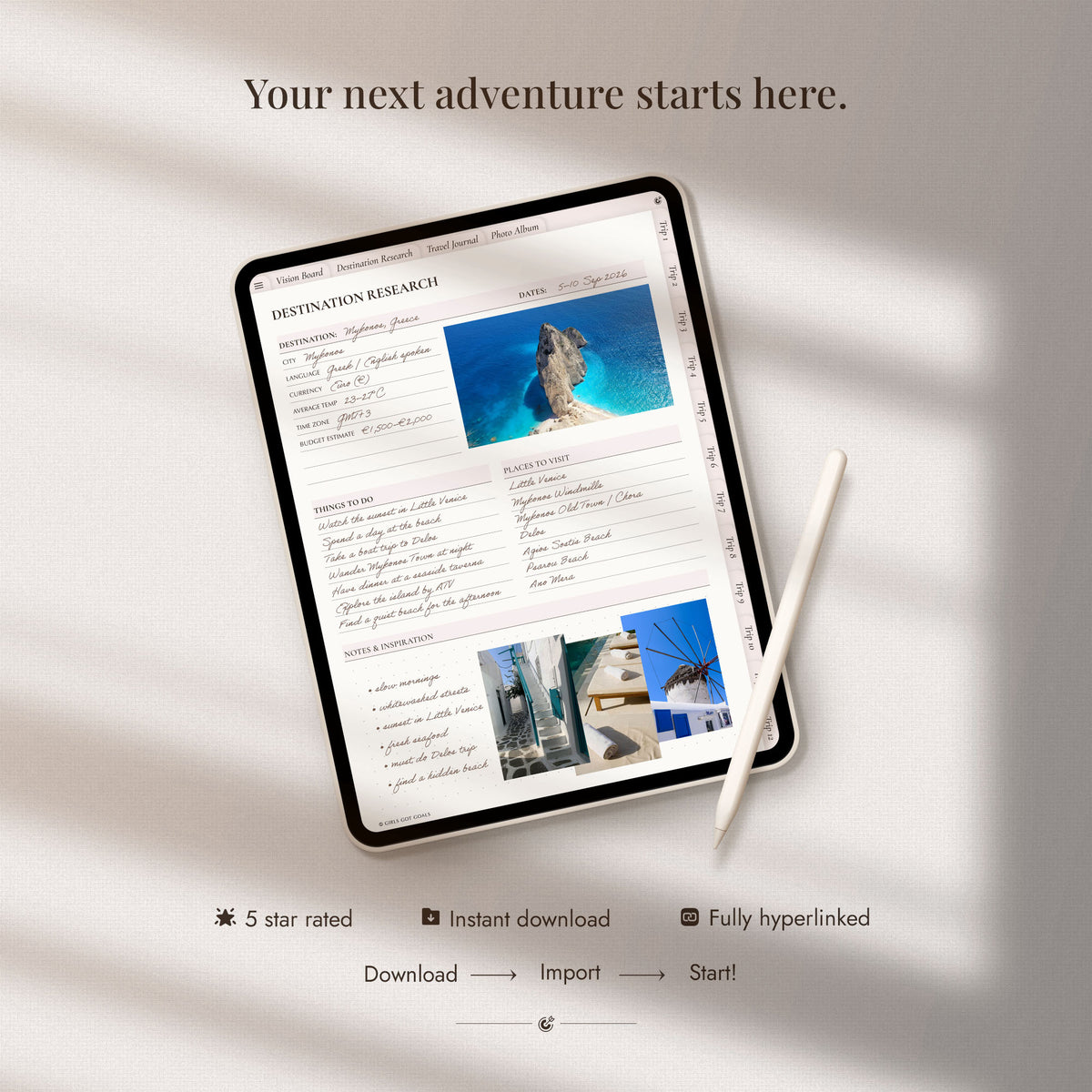
A complete hyperlinked planner for researching destinations, organising travel details and planning up to 12 trips. Keep your budgets, bookings, packing lists, itineraries, photos and favourite memories together in one beautifully connected travel journal.
What you’ll receive
What you’ll receive
- Hyperlinked digital travel planner
- Alternative covers
- Setup and import guide
Compatibility
Compatibility
This planner is optimised for use on an iPad, but is also fully functional on other tablets (Android, Surface Pro, Kindle Scribe), laptops, desktop computers and even smart phones. For the most natural handwriting experience, we recommend using the planner on a tablet with a stylus.
A suitable note-taking app is required. Some of these apps are free, others come at a small one-time fee. The planner works with Goodnotes, Notability, Xodo, Samsung Notes and all other planning apps that support PDF annotation and internal hyperlinks.
A step-by-step setup guide is included with your download to help you import the planner and start using its clickable links.

-
✓ All-in-one travel planning system
-
✓ Plan up to 12 individual trips
-
✓ Undated — reuse every year
From the first idea to the final memory
A great trip begins long before you arrive. From researching where to stay and keeping track of bookings to planning what to pack and how to spend each day, there are countless details competing for your attention.
The Digital Travel Planner gives every part of your journey a clear place, helping you feel prepared before you leave and more present once you’re there. When the trip is over, use the journal, photo and memory pages to preserve the moments you’ll want to revisit.
What's inside
-
Travel inspiration & research
- Travel vision board
- Yearly travel calendar
- Destination wishlist
- Travel bucket list
- Destination & accommodation research
-
Plan up to 12 trips
- Dedicated section for each adventure
- Trip overviews and destination details
- Planning checklists and to-do lists
- Travel vision boards
- Space to keep trips separate and easy to navigate
-
Bookings & transportation
- Flight information
- Airport transportation
- Car rental details
- Bus transportation
- Accommodation information
-
Budgets & preparation
- Travel budget planning
- Payment and activity tracking
- Shopping, souvenirs and gifts
- Carry-on and packing lists
- Outfit planning and useful phrases
-
Itineraries & experiences
- Places to visit
- Recommendations
- Activities and tours
- Restaurants
- Weekly and daily itinerary options
- Places to visit
-
Memories & journalling
- Trip journals
- Memory and photo pages
- Three additional travel journals
- Photo album
- Reusable notes and list templates
Collapsible content
View the complete list of planning templates
Main Travel Planner
- Travel Vision Board
- Yearly Calendar
- Bucket List
- Destination Research
- Accommodation Research
- Travel Journals
- Photo Album
- Monthly Calendars
Destinations
- Africa
- Europe
- Asia
- North America
- Australia
- South America
Trip Travel Information
- Trip Overview
- Destination Information
- Trip Vision Board
- Planning Checklist
- To-Do List
- Flight Information
- Airport Transportation
- Car Rental Information
- Bus Transportation
- Accommodation
Travel Budget
- Budget Planner
- Shopping List
- Payment Tracker
- Tours & Activities Tracker
- Souvenirs & Gifts
Trip Preparation
- Carry-On Packing List
- Packing Lists
- Places to Visit
- Recommendations
- Activities & Tours
- Restaurants
- Outfit Planner
- Useful Words & Phrases
Itineraries
- Travel Itinerary
- Weekly Itineraries
- Daily Itineraries
Memories
- Trip Journal
- Trip Memories
- Trip Photos
Notes
- Lined
- Narrow-Lined
- Grid
- To-Do Lists
- Dotted
- Blank
-
Optimised for tablets
But fully functional on laptops, desktop & even phones
-
Works with leading apps
Including GoodNotes, Notability, and all similar apps
-
Clickable tabs and buttons
Fully hyperlinked for easy navigation
-
Setup guide included
Step-by-step guide and friendly customer support
Start planning in minutes
1. Purchase your planner
Complete checkout through the website.
2. Download your files
Access the files from your order confirmation page or delivery email.
3. Import and start planning
Add the planner to your chosen note-taking app and start planning.
Is this the right planner for you?
This planner is ideal for you if you:
✓ Love planning trips in detail and want everything organised before you leave
✓ Want one place for destination research, bookings, budgets, packing lists and itineraries
✓ Prefer keeping each trip separate, with dedicated planning space for up to 12 adventures
✓ Enjoy creating thoughtful travel plans without relying on scattered emails, screenshots and notes
✓ Want to record your favourite moments with journals, photos and memory pages after each trip
✓ Prefer an undated planner you can use for future travels and return to whenever your next adventure begins
What our community is saying
-
★★★★★
Cute, organised and easy to plan with
I love this planner. Very cute and well organized, giving me plenty of prompts to make my travel easy.
Ashley
-
★★★★★
Everything you need for organised travel
Awesome for travel! You need this to keep everything organized.
Gladys
-
★★★★★
A beautiful way to capture every detail
I loved filling this out every night it helped me capture every detail.
Nayaki
4.9/5 average review rating ★★★★★
Ready to plan your next adventure?
Want the complete planning collection?
The Ultimate Planner Bundle brings all of our digital planners together in one beautifully organised collection, perfect if you want the freedom to plan every area of life, or simply prefer having the right planner ready whenever your priorities change.
The Ultimate Digital Planner Bundle
Share

it is a nice planner
Super cute, detail and really useful
I, love them, thank you
awesome for travel. You need this to keep everything organized
Here when you need us
I’m new to digital planning, where should I start?
You’re in the right place. Our Digital Planning for Absolute Beginners guide walks you through everything you need to know, including choosing a device and app, downloading and importing your planner, using hyperlinks, writing on the pages and adding digital stickers. Read the Digital Planning for Absolute Beginners guide
What device and app do I need to use this digital planner?
You can use the planner on a tablet, laptop, desktop computer or even a smartphone with a compatible PDF annotation or note-taking app. Popular options include Goodnotes, Notability, Xodo, Penly, Noteshelf and Samsung Notes, and all similar apps that support hyperlinked PDF files.
A tablet and stylus offer the most natural handwriting experience, but they are not essential, you can also type directly onto the pages using a computer or mobile device. Your device, stylus and chosen app are not included with the planner.
Can I use this planner with the free version of Goodnotes?
Not currently. The free GoodNotes plan limits imported files to 5 MB, and this planner is larger than that, so you’ll need a paid GoodNotes plan to import and use it there.
There are many free app alternatives. Popular choices include CollaNote (iOS), Kilonotes (iOS), Samsung Notes (Android), and Xodo (iOS, Android, Windows)
How do I download and import the planner after purchase?
Your files will be available as an instant digital download after checkout and will also be sent to the email address used for your order.
A step-by-step setup guide is included to walk you through downloading your files and importing the planner into your chosen app. Most customers are ready to start planning within just a few minutes.
Can I customise, duplicate or print the pages?
Yes. You can personalise the planner with handwriting, typed text, images and digital stickers inside your note-taking app. Most compatible apps also allow you to duplicate, move and delete individual pages so you can make it truly your own.
You can also print the pages for your personal use. Just bear in mind that clickable tabs and hyperlinks are digital features, so they will not function on printed pages.
Can I use the planner on more than one device?
Yes. You can use the planner across your own compatible devices. Many note-taking apps also offer syncing, allowing you to access your planner from more than one device using the same account.
Can I share the planner with someone else?
Your purchase is for personal use, it cannot be shared or redistributed to another person. Anyone else who would like to use the planner will need their own copy.
What if I need help or have a problem with my files?
We’re here to help. Your purchase includes a detailed setup guide, but if anything feels unclear or you have trouble downloading, opening or importing your files, simply contact us and tell us what device and app you are using. We’ll help you work through the issue and get your planner set up so you can start using it as soon as possible.
Need more help? Browse the full set of frequently asked questions in the Help Centre, or contact us for friendly advice.